The Short Answer
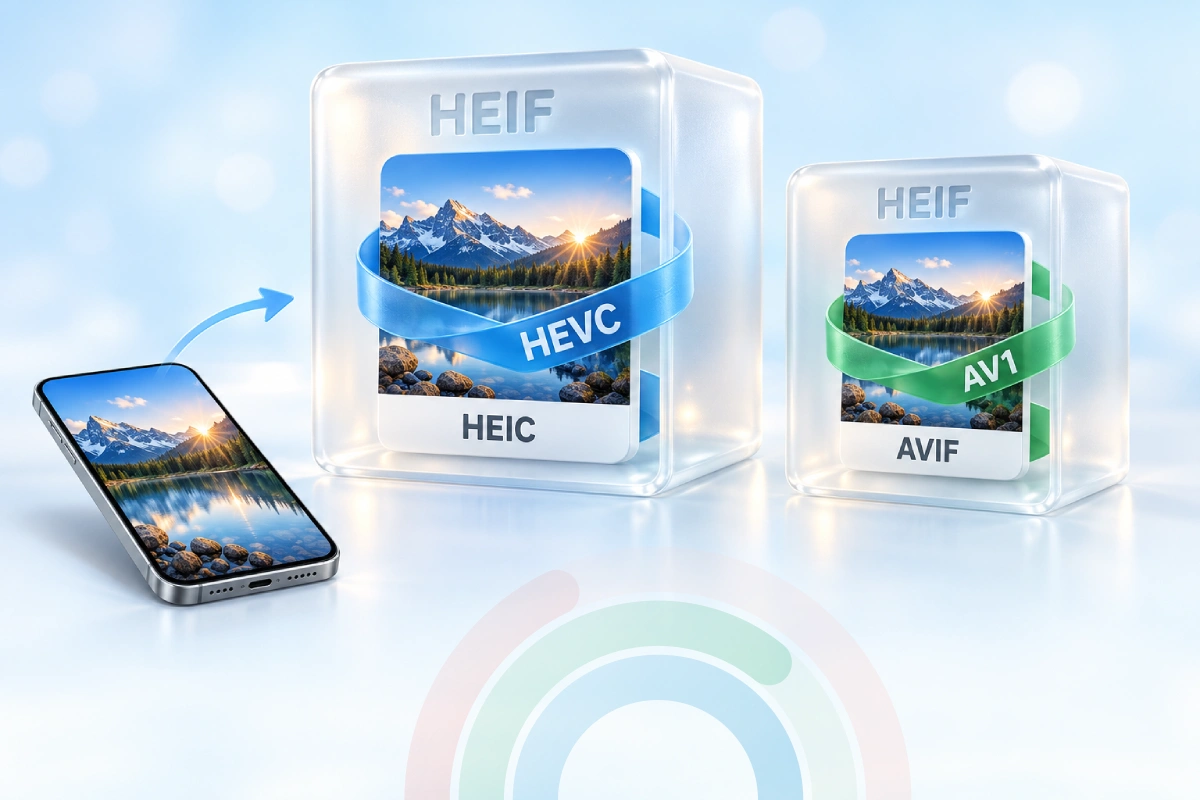
HEIF is the container - the box the picture lives in.
HEIC is a HEIF file whose image is compressed with HEVC (H.265), the version Apple uses for iPhone photos.
So every HEIC file is a HEIF file, but not every HEIF file is HEIC. Think of HEIF as the lunchbox and HEVC as the sandwich - HEIC is simply "the lunchbox with that sandwich inside".
In practice: .heic and .heif files open in the same apps and convert with the same tools. Need a JPG right now? Use HEIC to JPG or HEIF to JPG - both run in your browser.
What Is HEIF?
HEIF stands for High Efficiency Image File Format. It was developed by MPEG - the group behind MP3 and MP4 - and finalized in 2015 as the standard ISO/IEC 23008-12.
HEIF itself does not compress anything. It is a container that describes how images and extra data are stored in one file.
That container can hold much more than a single JPEG ever could:
- Several images - bursts, image sequences and Live Photos
- Depth maps - the data behind Portrait mode background blur
- Transparency - an alpha channel, like PNG
- 10-bit color and HDR - smoother gradients than 8-bit JPEG
- Edits and thumbnails - stored next to the original image
What Is HEIC?
HEIC (High Efficiency Image Container) is HEIF with images compressed by the HEVC video codec. Apple made it the default photo format with iOS 11 in 2017.
Because HEVC is far more efficient than the decades-old JPEG method, a HEIC photo is often around half the size of the same JPEG at similar quality. That is why your iPhone can hold so many more photos.
Apple is not the only user. Many Samsung and other Android phones offer a "high efficiency pictures" option that saves .heic files, and Canon and Sony cameras can save HEIF photos with the .hif extension.
Quick Comparison
| HEIF | HEIC | |
|---|---|---|
| What it is | The container standard | HEIF with HEVC-compressed images |
| Compression | Any supported codec (HEVC, AV1, AVC, JPEG) | HEVC (H.265) only |
| File extensions | .heif, .hif, sequences .heifs |
.heic, sequences .heics |
| Created by | MPEG (2015) | Popularized by Apple (iOS 11, 2017) |
| Where you see it | Cameras, some Android phones | iPhone, iPad, many Android phones |
| File size vs JPEG | Depends on the codec | Often about 50% smaller |
| Opens in web browsers | Safari only | Safari only |
Bottom line of the table: the difference is the codec inside, not the quality or the features you get.
The HEIF Family - HEIC, AVIF and More
Because HEIF is just a container, different codecs give you different "family members".
- HEIC - HEIF + HEVC. The iPhone photo format.
- AVIF - HEIF + AV1. Royalty-free, and supported by Chrome, Firefox, Edge and Safari. See our AVIF converters.
- Plain HEIF - the general case, used by some cameras and phones.
That is why AVIF took off on the web while HEIC stayed on phones. HEVC needs licensing, so most browsers never added it.
Why Your iPhone Saves HEIC
iPhones shoot HEIC because of the High Efficiency camera setting. You can switch it off.
- Open Settings and tap Camera.
- Tap Formats.
- Choose Most Compatible to shoot JPG instead of HEIC.
Want to keep HEIC on the phone but get JPGs on your computer? Go to Settings > Photos and, under Transfer to Mac or PC, choose Automatic. The iPhone then converts photos when you copy them over a cable.
Worth knowing: Most Compatible files are bigger, so your storage fills up faster. Many people keep High Efficiency on and convert only the photos they share.
How to Open HEIC and HEIF Files
On Windows
Windows 10 and 11 need two free add-ons from the Microsoft Store: HEIF Image Extensions and HEVC Video Extensions from Device Manufacturer. After that, the Photos app opens .heic files.
On Mac, iPhone and iPad
They just work. Preview and Photos open HEIC and HEIF natively on any recent macOS and iOS.
On Android
Android 9 and newer can display HEIF and HEIC images, and most gallery apps open them. Older phones and some apps may show nothing.
In a Web Browser
Only Safari (version 17 and newer) displays HEIC directly. In Chrome, Firefox or Edge, open the file with our HEIC File Viewer - nothing to install, and the photo never leaves your device.
Which Format Should You Convert To?
Pick the output by where the photo is going next.
- HEIC to JPG - for sharing, email, upload forms and printing. Works everywhere.
- HEIC to PNG - for editing without adding more compression loss.
- HEIC to WebP - for websites, with small files at good quality.
- HEIC to PDF - for documents, receipts and scans.
- Compress HEIC - to keep the format but shrink the file.
Got .heif or .hif files from a camera? The HEIF converters handle them the same way. All of them convert in your browser, so your photos are never uploaded.
Turn iPhone Photos Into JPG
Drop your HEIC files and get JPGs that open on any device - free, private and in batches.
Convert HEIC to JPG All HEIC ConvertersCheck What Your File Really Is
The extension does not always tell the truth. A photo named .heic can really be a JPEG, and a file someone renamed to .jpg can still be HEIC inside.
The Image Format Detector reads the file's first bytes and shows the real format. For the details inside - codec, bit depth, dimensions and camera data - use the HEIC Analyzer or the EXIF Viewer.
Frequently Asked Questions
Is HEIC better quality than JPG?
At the same file size, yes - HEIC keeps more detail and supports 10-bit color. At the same quality, a HEIC file is usually much smaller.
Is HEIF the same as HEIC?
Almost. HEIF is the container and HEIC is HEIF with HEVC compression. For everyday use, apps and converters treat them the same.
Does converting HEIC to JPG lose quality?
A little, because JPG is a lossy format. At a high quality setting (90% or more) the difference is not visible in normal viewing.
Why can't I open HEIC files on Windows?
Windows needs the HEIF Image Extensions and HEVC Video Extensions add-ons. Without them, use the HEIC File Viewer or convert the photo to JPG.
Is AVIF part of HEIF?
Yes. AVIF uses the same HEIF container with the AV1 codec instead of HEVC, which is why web browsers support it widely.
Can I just rename .heic to .jpg?
No. Unlike .jfif and .jpg, the data inside is a different format, so most apps and upload forms will reject the renamed file. You need a real conversion such as HEIC to JPG.
Do my photo's date and location survive conversion?
It depends on the converter and its settings. Check the result with the EXIF Viewer, and if you want the location gone before sharing, use the EXIF Data Remover.
Still stuck? Ask us - we reply faster than a JPEG loads on dial-up.
The Bottom Line
HEIF is the container, HEIC is that container with HEVC inside, and AVIF is its web-friendly sibling with AV1.
For your own photo library, HEIC is a great format - small files, great quality. For anything you share, convert to JPG and nobody will ever ask "what is this file?" again.
- Every HEIC is a HEIF, not the other way around
- iPhones shoot HEIC unless you pick Most Compatible
- Only Safari opens HEIC in a browser
- Renaming does not work - convert instead