Turn any image into a crisp, multi-size ICO icon - or get the images back out of one.
The PNG to ICO converter is the classic, and JPG, SVG, WebP and HEIC work just as well.
Building a website icon instead? The favicon converters and the Favicon Generator make the full set.
Every converter packs the standard Windows sizes (16 to 256 px) into one ICO file.
Convert JPG photos to ICO icon format
Convert PNG images to multi-size ICO icons
Convert SVG vectors to ICO icon format
Convert Adobe Illustrator files to multi-size ICO icons
Convert AVIF images to ICO icon format
Convert BMP to ICO in your browser - Windows-ready icons, 16 to 256 px, transparency, crop to square, favicon preset
Convert emoji characters to ICO icon files
Convert GIF images to ICO icon format
Convert Apple HEIC photos to ICO icons
Convert any image format to ICO icons
Convert JPEG XL images to ICO icons
Turn PDF pages into multi-size ICO icons
Convert Photoshop PSD files to ICO icons
Convert TIFF images to ICO icon format
Convert WebP images to ICO icon format
Pull every size out of an ICO file as a normal image you can edit or share.
Extract PNG images from ICO icon files
Extract AVIF images from ICO icon files
Convert ICO icons to Base64 data URIs for HTML and CSS
Extract BMP bitmaps from ICO icon files
Extract GIF images from ICO icon files
Convert ICO icons to JPG image format
Turn ICO icons into a PDF icon sheet with every size
Convert ICO icons to scalable SVG vectors
Extract WEBP images from ICO icon files
Nothing here matches "".
Our tool shelf is big, though. Try the site search or .
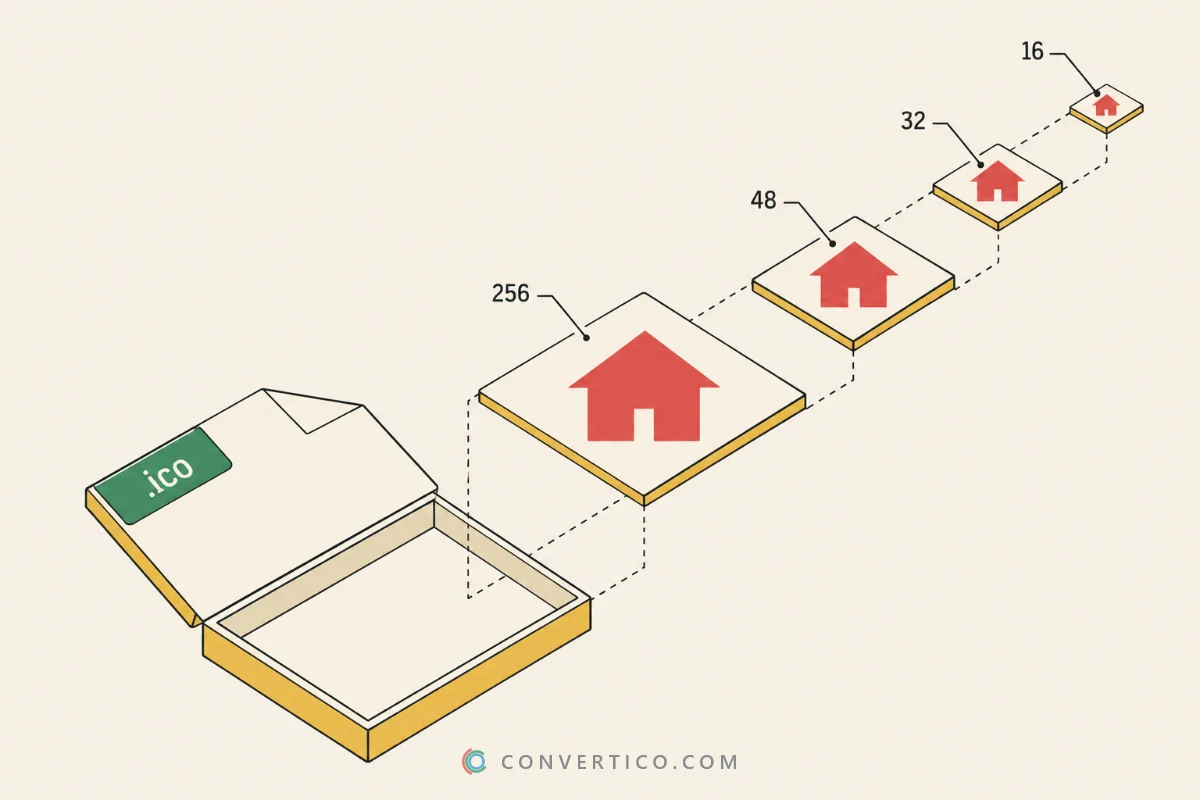
An ICO file is a small container that holds the same icon at several sizes, usually 16, 32, 48 and 256 pixels. Windows picks the right one for the taskbar, the desktop or a file list, so the icon stays sharp everywhere.
Start from a square image with a transparent background for the best result. If the source needs work first, use the Image Resizer or the Image Cropper, then convert.
16 to 256 px in a single file
PNG, SVG and WebP alpha survive
Opens in Explorer, shortcuts and apps
Most run in your browser - nothing uploaded
A favicon.ico still works in every browser. Convert a logo with PNG to ICO, or make the full set with the Favicon Generator.
Windows only accepts ICO files for folders and shortcuts. Photos from your phone convert directly with HEIC to ICO.
Developers need a multi-size ICO for every EXE. Check the result with the ICO Analyzer before you ship.
Got only the ICO? ICO to PNG gives you every size back as a normal image, ICO to SVG turns it into an SVG, and ICO to PDF makes a printable icon sheet. Paste a website address to grab its favicon first.
| Source | Transparency | Sharp at 256 px | Best for |
|---|---|---|---|
| PNG | Yes | If 256 px or larger | Logos, app icons, favicons |
| SVG | Yes | Always | Vector logos and UI icons |
| WebP | Yes | If 256 px or larger | Images saved from the web |
| JPG | No | If 256 px or larger | Photos and avatars |
| HEIC | Rarely | Yes | iPhone photos |
Want to test first? Grab a ready-made icon from the ICO sample files.
ICO is the Windows icon format. One ICO file holds the same picture at several sizes, so it looks crisp in browser tabs, on the desktop and in the taskbar.
To see which sizes a file contains, open it in the ICO Analyzer.
Open the PNG to ICO converter, upload your image and pick the sizes you need. Download the ICO and use it as a favicon, shortcut or app icon.
For a favicon, 16, 32 and 48 px are enough. For Windows apps and shortcuts add 64, 128 and 256 px so the icon stays sharp on high-DPI screens.
Need an exact size? Try the Icon Resizer.
Not quite. ICO is a file format, while a favicon is the small icon a website shows in browser tabs and bookmarks. Favicons are often ICO files, but they can also be PNG or SVG.
The favicon converters make every version a site needs.
Yes. ICO to PNG extracts every size with transparency, and ICO to JPG gives you a flat image. There are also converters to WebP, SVG and Base64.
Usually the source image was too small. Start from at least 256 x 256 px, or from an SVG, which scales to any size without losing detail.
ICO is for Windows and ICNS is for macOS. For a cross-platform app you need both - use PNG to ICNS for the Mac version, or convert directly with ICO to ICNS.
Yes. Images are processed securely and deleted from our servers automatically after a few hours. We never share or reuse your files.