The Short Answer
A blurry icon almost always means the file is missing the size it is being shown at.
Windows, browsers and phones then stretch or shrink another size to fit - and that is what turns sharp edges soft.
Every cause below has a quick fix.
| What you see | Likely cause | Fix |
|---|---|---|
| Soft at large sizes | The source image is too small | Bigger source or upscale |
| Mush at 16 px | Only a big size inside, or too much detail | Add small sizes, simplify |
| Blurry on some screens only | Display scaling, missing 20/24/40 px | Add the in-between sizes |
| Fuzzy favicon in the tab | No 32 px version | ICO with 16, 32 and 48 |
| Old icon after changing it | Windows icon cache | Clear the cache |
| White halo or jagged edges | JPG source or rough cut-out | Transparent PNG source |
Cause 1: The Source Image Is Too Small
You cannot get a sharp 256 px icon from a 64 px picture. The missing pixels have to be made up, and made-up pixels look soft.
Start from at least 256 × 256, ideally 512 or 1024 px - or from an SVG, which scales to any size without blur.
The Icon Maker marks a source as Soft when it is too small for the sizes you picked, so you see the problem before you download.
Only have the small version? Try these, in order:
- Look for the original logo file - an SVG or a large PNG from whoever designed it.
- Have an SVG? Convert it straight with SVG to ICO for perfect edges at every size.
- No luck? Enlarge it with the AI Image Upscaler first, then make the icon.
Cause 2: The ICO File Is Missing Sizes
An ICO file is a little box of pictures, one per size. Windows takes the closest one and resizes it.
Shrinking a 256 px picture down to 16 px throws detail away unevenly. Stretching a 32 px picture up to 48 px smears it.
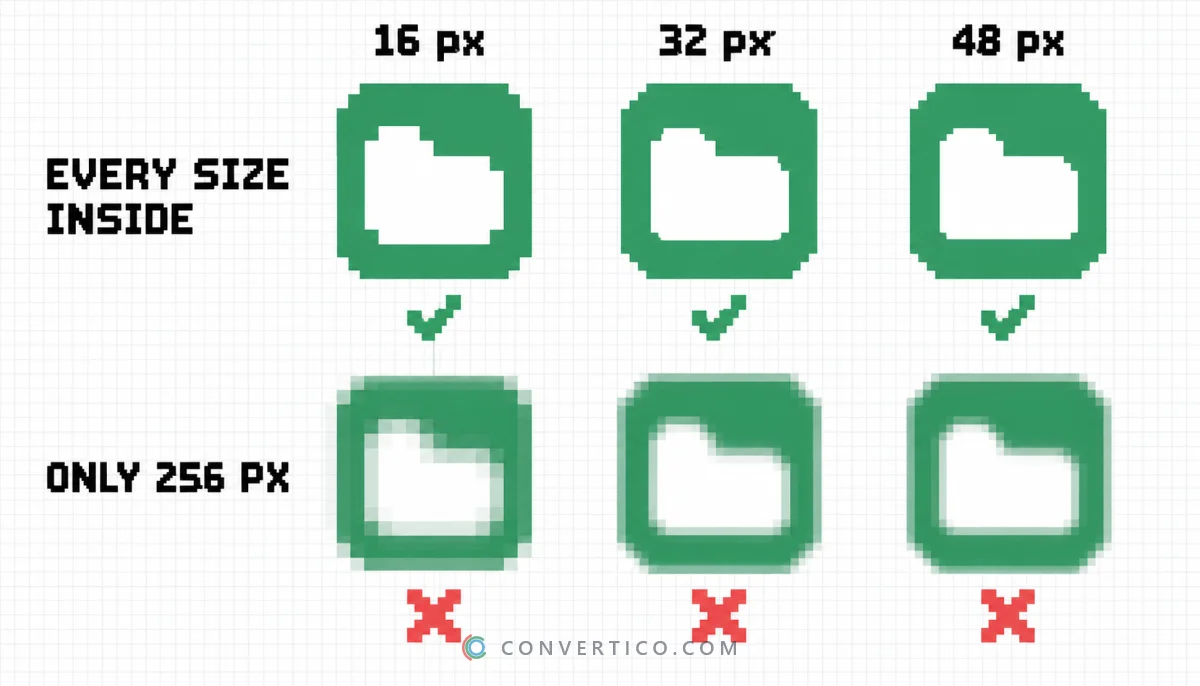
To see what your file contains, open it in the ICO Analyzer - it lists every size inside.
Missing some? Rebuild the icon in the Icon Maker with the Windows app preset, or add the sizes to an existing ICO with the Icon Resizer. The full list per platform is in the icon size cheat sheet.
Cause 3: Too Much Detail for 16 Pixels
A 16 × 16 icon has just 256 pixels in total. Thin lines, small text and photos turn into grey fuzz at that size.
Even a perfect file looks blurry when the design is too busy.
- One bold shape - the main symbol, nothing else.
- Thick lines - at least 2 px wide at 16 px.
- Strong contrast - dark on light or light on dark, not grey on grey.
- No words - one or two letters at most. The letter mode in the Icon Maker is made for this.
- Crop tight - too much padding makes the icon tiny inside its box.
Watch the 16 and 32 px preview tiles in the Icon Maker while you crop. They show the real result, not a scaled-down preview.
The pro trick: big brands often draw a separate, simpler version just for 16 px. If your logo has a tagline or fine detail, a plain symbol or initials will look far better in a tab or a file list.
Cause 4: Display Scaling (125% and 150%)
Many laptops run Windows at 125% or 150% scaling. At those settings a 16 px icon is drawn at 20 or 24 px.
If the ICO has no 20 or 24 px picture, Windows stretches the 16 px one - and you get a blurry icon on your laptop that looks fine on your monitor.
Check your setting in Settings > System > Display > Scale.
Fix it by including 20, 24 and 40 px in the ICO. The Windows app preset in the Icon Maker already has them.
Cause 5: Windows Shows an Old Cached Icon
Fixed the file but still see the blurry version? Windows keeps a cache of icons, and it is in no hurry to forget them.
Open Command Prompt and run:
taskkill /f /im explorer.exe
del /a /q "%localappdata%\IconCache.db"
del /a /f /q "%localappdata%\Microsoft\Windows\Explorer\iconcache*"
start explorer.exe
The taskbar disappears for a moment and comes back with fresh icons. More icon fixes are in the Windows 11 custom icons guide.
Cause 6: Why Your Favicon Looks Blurry
On high-resolution screens - most laptops and every phone - a browser tab shows the 16 px favicon at 32 px or more.
If your favicon.ico holds only a 16 px picture, the tab stretches it.
- Put 16, 32 and 48 px in your favicon.ico.
- Add an SVG favicon - it is sharp at any size in modern browsers.
- Add a 180 px apple-touch-icon, or iPhones blow up the small one on the home screen.
- Give Google a version larger than 48 px for search results.
Browsers cache favicons for a long time. After you upload the new one, add a version to the link - for example favicon.ico?v=2 - so visitors see it.
The Favicon Package Generator makes the complete set, and Favicon Preview shows how it looks in a tab before you upload it.
Cause 7: White Halos and Jagged Edges
Sometimes the icon is sharp, but its edges are not.
A JPG has no transparency, so a JPG logo brings its white background along - on a dark wallpaper you get a white box or a pale halo. JPG compression noise also gets very visible at icon sizes.
Start from a transparent PNG instead. Remove a background with the PNG Background Remover, or clean up an existing icon with the Transparent Icon Maker.
The full story is in why your JPG icon has a white background.
Checklist for a Sharp Icon
- Source at 512-1024 px, or an SVG
- Every size in the file: 16, 20, 24, 32, 40, 48, 64, 256
- A simple design that still reads at 16 px
- Transparent PNG source, not a JPG
- Favicon with 32 px and an SVG version
- Icon cache cleared after you change it
Rebuild Your Icon - Sharp This Time
See the real 16 and 32 px result while you crop, and download an ICO with every size inside.
Icon Maker ICO AnalyzerFrequently Asked Questions
Why is my icon blurry in Windows 11?
The ICO file is usually missing the size Windows needs, so it stretches another one. Rebuild it with 16, 20, 24, 32, 40, 48, 64 and 256 px, then clear the icon cache.
Why does my icon look pixelated when it is bigger?
The source image was too small. Start from at least 512 px or an SVG, or upscale the source before making the icon.
Why is my favicon blurry?
High-resolution screens show the tab icon at 32 px or more. Add a 32 px size to favicon.ico, plus an SVG favicon and a 180 px Apple touch icon.
What resolution should an icon be?
Design at 1024 × 1024 px, then export each size the platform needs. For Windows, the largest size in the ICO is 256 px.
Can I fix a blurry icon without the original file?
Yes - enlarge it with an AI upscaler first, then rebuild the icon with every size. It will not be perfect, but it will be much sharper.
Why does my icon still look blurry after I replaced it?
Windows is showing a cached copy. Restart Explorer or clear the icon cache.
Does saving as ICO lower the quality?
No. ICO stores each size as an uncompressed bitmap or a lossless PNG, so nothing is lost - the blur comes from missing sizes or a small source.
Still stuck? Ask us - we reply faster than a JPEG loads on dial-up.
The Bottom Line
- Blurry = the size on screen is missing from the file
- Start big: 512-1024 px or SVG
- Include 20, 24 and 40 px for scaled laptop screens
- Simplify the design for 16 px
- Still blurry after fixing it? Clear the icon cache
Your icon is the smallest thing people see of you - but they see it all day. Worth the two minutes.